FEATURES

Everything Pushyou does,
in order of what matters most.

Your programs report and ask. You decide from your phone or the web, and the result comes back to the same request. Every screen below is the real app with example data.

Who uses Pushyou

CoreWhy people install Pushyou. Start here.

01 · QuestionsiOS · Android · Web

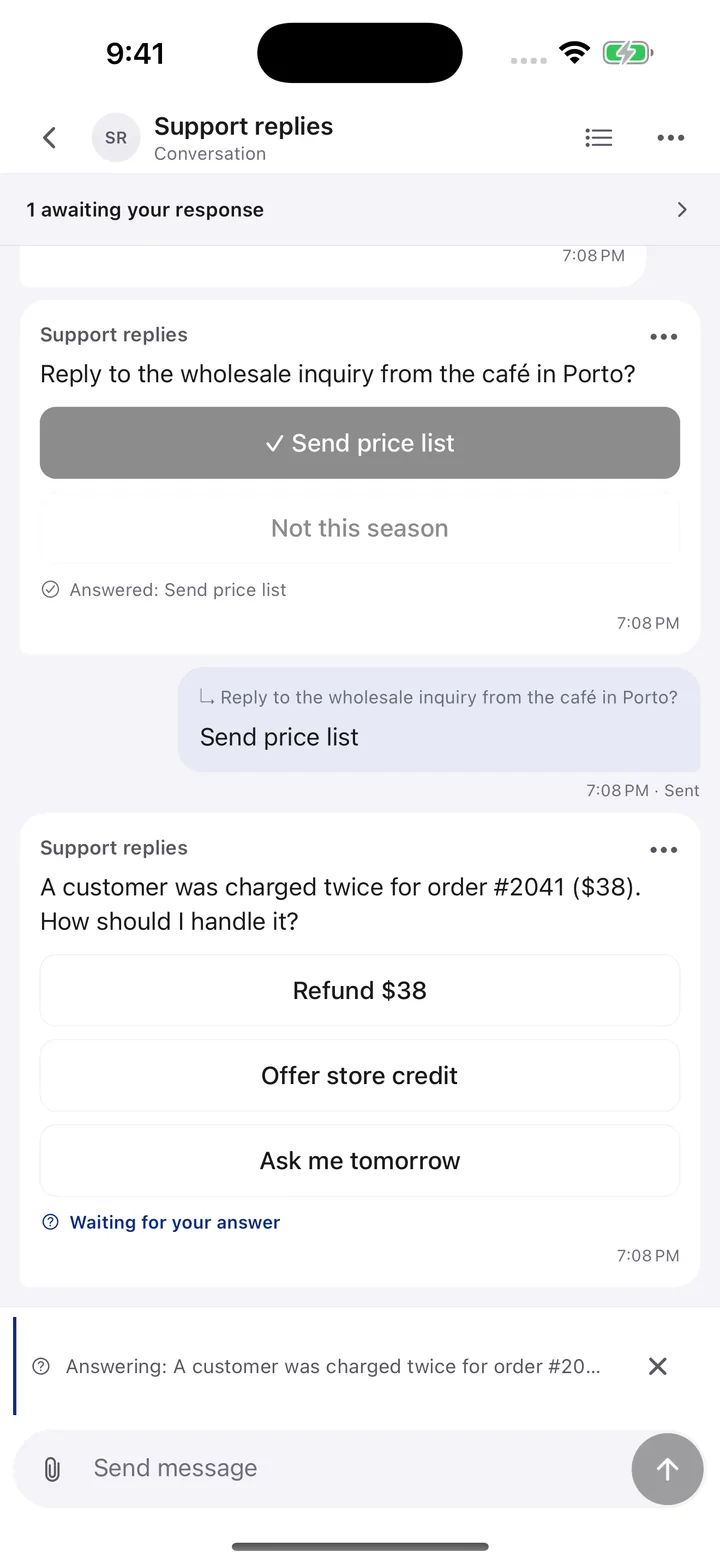
Questions that wait for your answer

When a program needs a decision it asks instead of guessing. You get a notification, tap an option or reply in your own words, and the program continues with your answer.

Included

  • Up to eight answer buttons, or a free-text reply
  • A plain reply answers the newest waiting question; you can reply without answering
  • Questions stop waiting after 24 hours by default, and the program sees whether you answered

Not included or limited

  • Pushyou does not run your agent; it must still be running to receive the answer
  • Up to 20 unanswered questions per conversation

How a program starts it · MCP · pushyou_ask

{ "conversation_id": "support", "id": "refund-2041",
  "question": "Customer was charged twice for #2041 ($38). How should I handle it?",
  "options": [{ "id": "refund", "label": "Refund $38" }, { "id": "credit", "label": "Offer store credit" }] }

Available: iOS, Android and web

A question with answer buttons waiting in a conversation
Real app screen · example data

02 · Approval requestsiOS · Android · Web

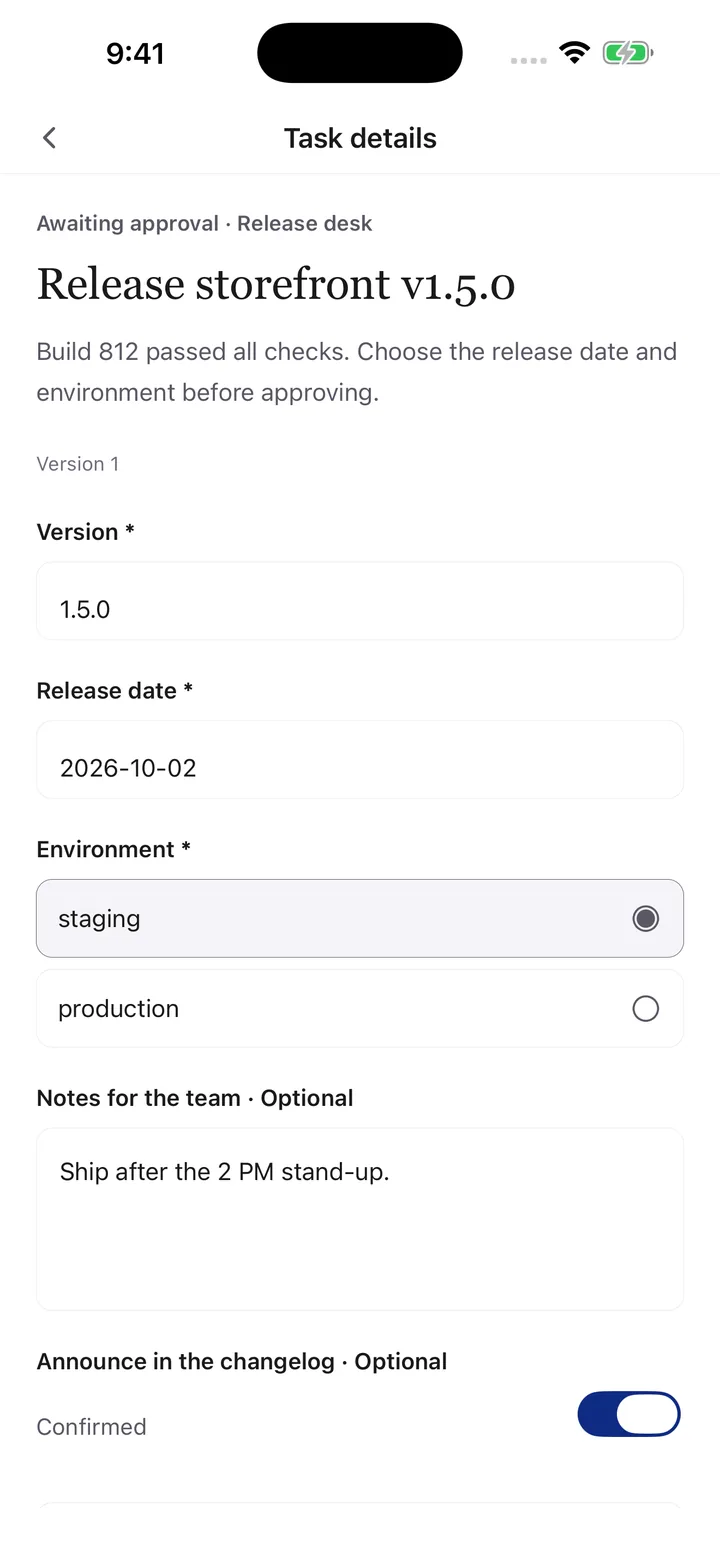
Approve, reject or ask for changes

Programs send consequential work as an approval request. You review the details, fill in any inputs, and only the exact version you approved can run.

Included

  • Typed inputs: text, numbers, dates, choices and checkboxes, up to 12 fields
  • Request changes and get a new version; every version is kept
  • A deadline expires requests nobody approved; retries need your review

Not included or limited

  • Only you approve; program keys and AI agents cannot approve for you
  • Your program runs the work and reports the result; Pushyou does not execute it

How a program starts it · REST

POST /v1/conversations/release-desk/tasks
{ "id": "deploy-1.4.4", "kind": "deploy-staging", "title": "Deploy storefront v1.4.4 to staging",
  "fields": [{ "id": "window", "label": "Deploy window", "type": "select", "options": ["Now", "Tonight"] }] }

Available: iOS, Android and web

An approval request with input fields
Real app screen · example data

03 · ReportsiOS · Android · Web

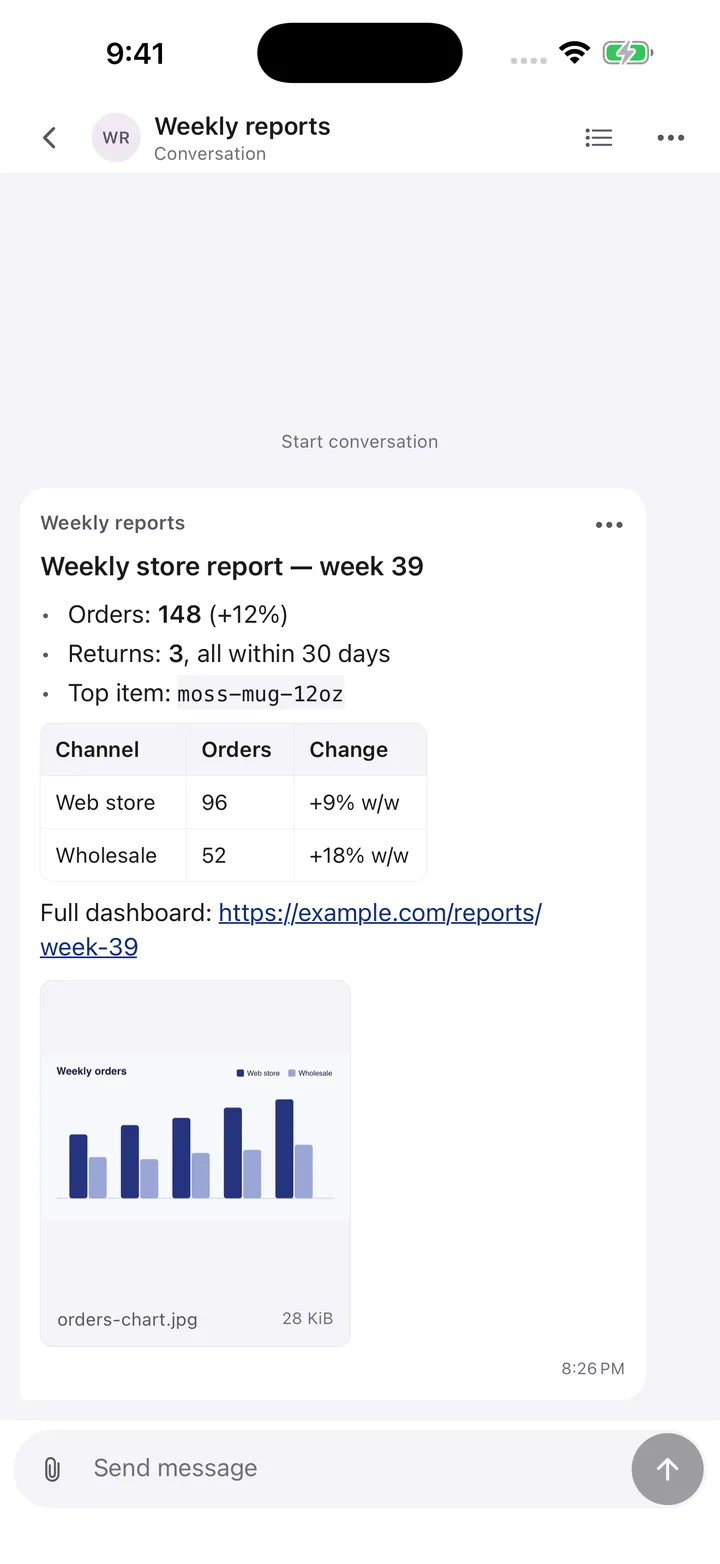
Reports your programs send, easy to read

Scripts, automations and agents post updates to a conversation. Markdown renders as headings, lists, tables, code and links, and photos or videos arrive alongside.

Included

  • One conversation per work stream, with unread counts, pins and search
  • Markdown by default; plain text when a program asks for it
  • Mark routine updates as low priority so they wait for the daily summary instead of buzzing

Not included or limited

  • Up to four photos or videos per message (images 10 MB, videos 25 MB)
  • No live streaming: progress arrives as separate messages

How a program starts it · REST

POST /v1/conversations/release-desk/messages
{ "id": "build-812", "text": "## Build 812 passed\n- **143** tests\n- [Logs](https://ci.example.com/812)", "priority": "low" }

Available: iOS, Android and web

A conversation with a Markdown report from a program
Real app screen · example data

04 · IntegrationsMCP · REST · n8n

Connect what you already run

AI agents connect through MCP, scripts and servers through REST. n8n templates, a receiver for Claude Code and Codex, Claude Code hooks and signed webhooks cover the rest.

Included

  • MCP: 26 tools, sign-in approved in the app
  • Receiver: forwards your replies to Claude Code, Codex or your own program on your computer
  • Webhooks: signed deliveries of replies, actions and task updates, with retries

Not included or limited

  • The receiver runs on your computer (Node 22+) and stops when it sleeps
  • MCP does not keep an agent running in the background

Available: Documented at pushyou.app/docs and in llms.txt

MCP · Claude Code

claude mcp add --transport http pushyou https://pushyou.app/mcp

Receiver · answers reach your agent

pushyou-receiver run --conversation release-desk --state-dir ./.pushyou-receiver/release-desk --start now --agent claude --project ~/app

n8n

Import n8n-content-approval.json from the connection guide

Webhook signature

X-Pushyou-Signature: v1=HMAC-SHA256(timestamp + "." + body)
Commands from the public documentation

EverydayWhat makes daily use fast and quiet.

05 · ResultsiOS · Android · Web

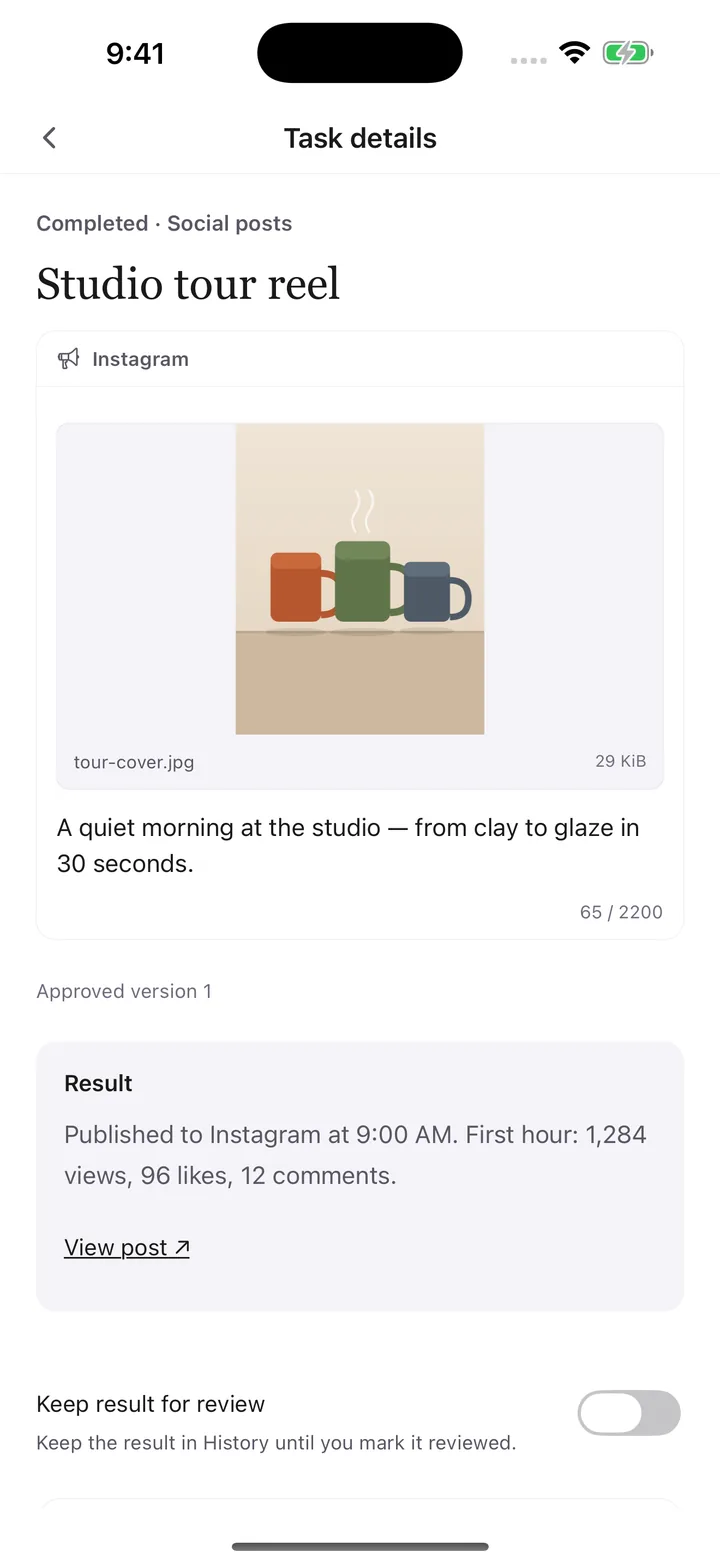
The result comes back to the same request

After you approve, the connected program reports what actually happened. The outcome, links and status stay attached to the request you decided, not lost in a new thread.

Included

  • Succeeded, failed or needs review, as reported by the program
  • Up to five result links, such as the published post or a log
  • Keep a result in History until you mark it reviewed

Not included or limited

  • Results are what your program reports; Pushyou does not verify the outcome elsewhere

Available: iOS, Android and web

A completed request with its reported result and link
Real app screen · example data

06 · Content approvaliOS · Android · Web

See the post before it goes out

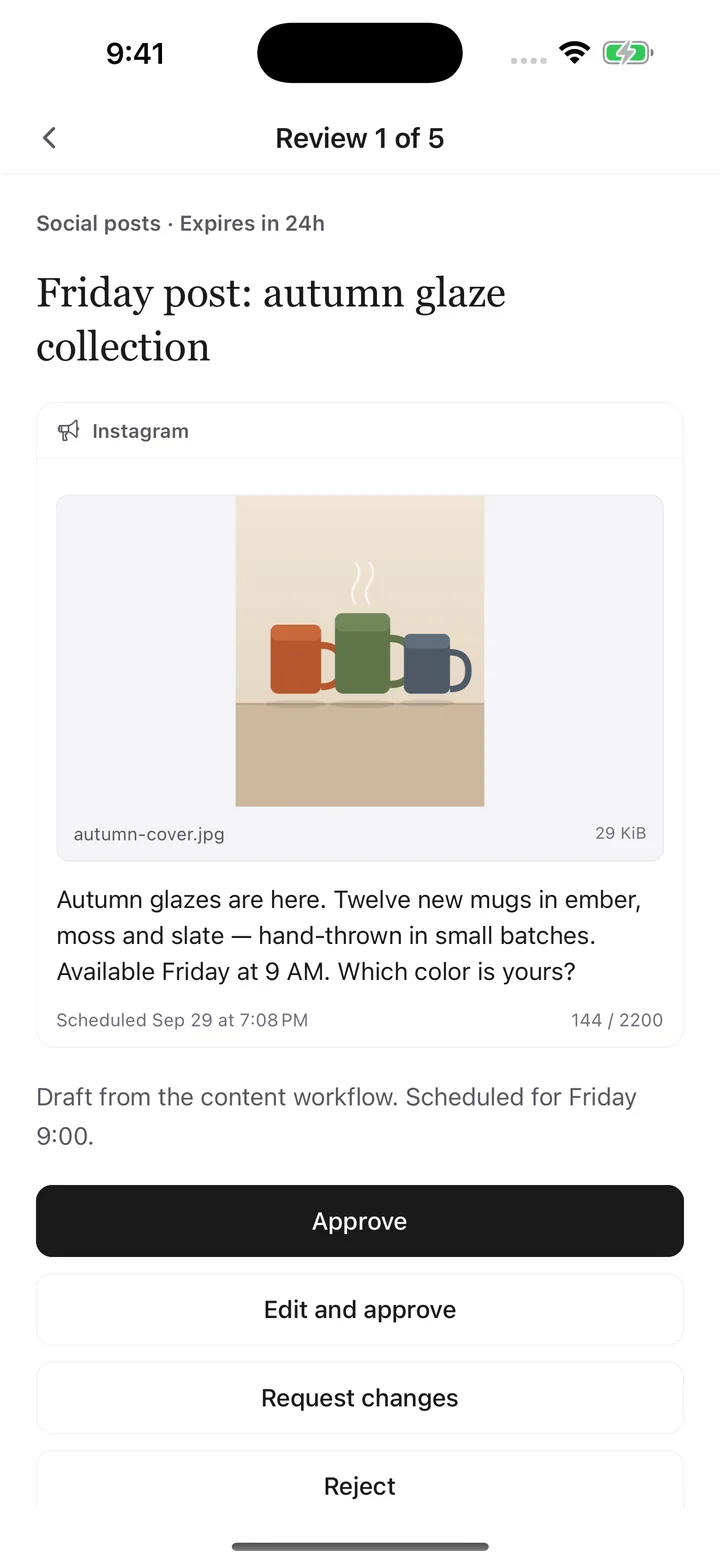
Automations send drafts as a preview with the image, caption, link and schedule. Fix a word and approve in one step; the publishing step receives the version you approved.

Included

  • Platform previews with character limits: X 280, Threads 500, Instagram 2,200, LinkedIn 3,000
  • Edit and approve saves your edit as a new version, then approves it
  • Deadlines show how long the draft can still go out

Not included or limited

  • Pushyou does not publish to social networks; your automation does

How a program starts it · REST · n8n template included

"preview": { "platform": "instagram", "caption": "Autumn glazes are here…",
  "attachment_ids": ["cover"], "scheduled_for": 1790665200000 }

Available: iOS, Android and web. Pushyou does not publish to social networks; your automation does.
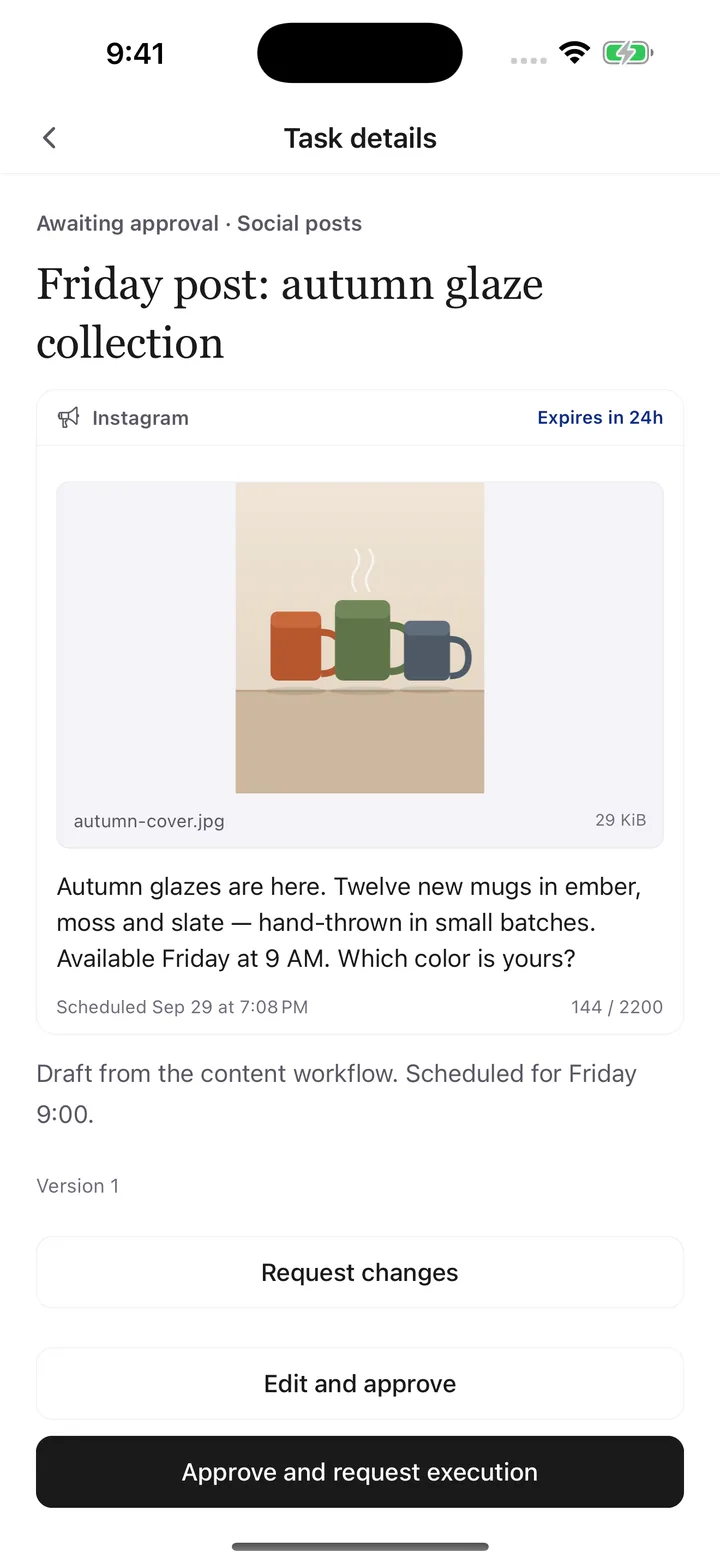
A social post draft with image, caption and character count
Real app screen · example data

07 · Lock screen answersRolling out

Answer from the notification

Answer a question or approve a request straight from the notification. Pushyou asks for your device passcode or biometrics first, and clears notifications that were already answered anywhere.

Included

  • Up to three options and a text reply; Approve and Reject for requests without inputs
  • With lock screen previews off, buttons stay generic and hide the content
  • Answered or decided items disappear from your other devices

Not included or limited

  • Needs the newest app; iOS arrives in a later update
  • Requests that need inputs open in the app instead

Available: Rolling out with the next app update: in Android testing now, iOS in an upcoming update. Earlier app versions open the conversation instead.

9:41

P Pushyou · Support replies

A customer was charged twice for order #2041 ($38). How should I handle it?

Refund $38Offer store creditReply…

Face ID or passcode is required before an answer is sent.

Illustration · actual layout follows your phone

08 · Review queueiOS · Android · Web

Clear a busy day in one pass

Every request waiting for you, across conversations, oldest first. Approve, edit, request changes, reject or skip, and move to the next one.

Included

  • Shows your position, such as Review 1 of 5
  • Requests that still need inputs open in full detail
  • Opened from Needs response in Conversations or History

Not included or limited

  • Requests that need inputs open in full detail

Available: iOS, Android and web

The review queue showing the first of five requests
Real app screen · example data

09 · Approval rulesiOS · Android

Approve once. Then let it run.

After you approve the same kind of request three times in a row, Pushyou offers a standing rule. Matching requests in that conversation then run without asking, within a daily limit.

Included

  • Rules apply per conversation and per request kind, such as deploy-staging
  • A daily limit (20 by default) and required inputs still apply
  • Turn rules on in the mobile app; turn them off from the app or the web

Not included or limited

  • Turn rules on in the mobile app only
  • A daily limit caps automatic approvals

Available: iOS and Android; the web shows rules and can turn them off
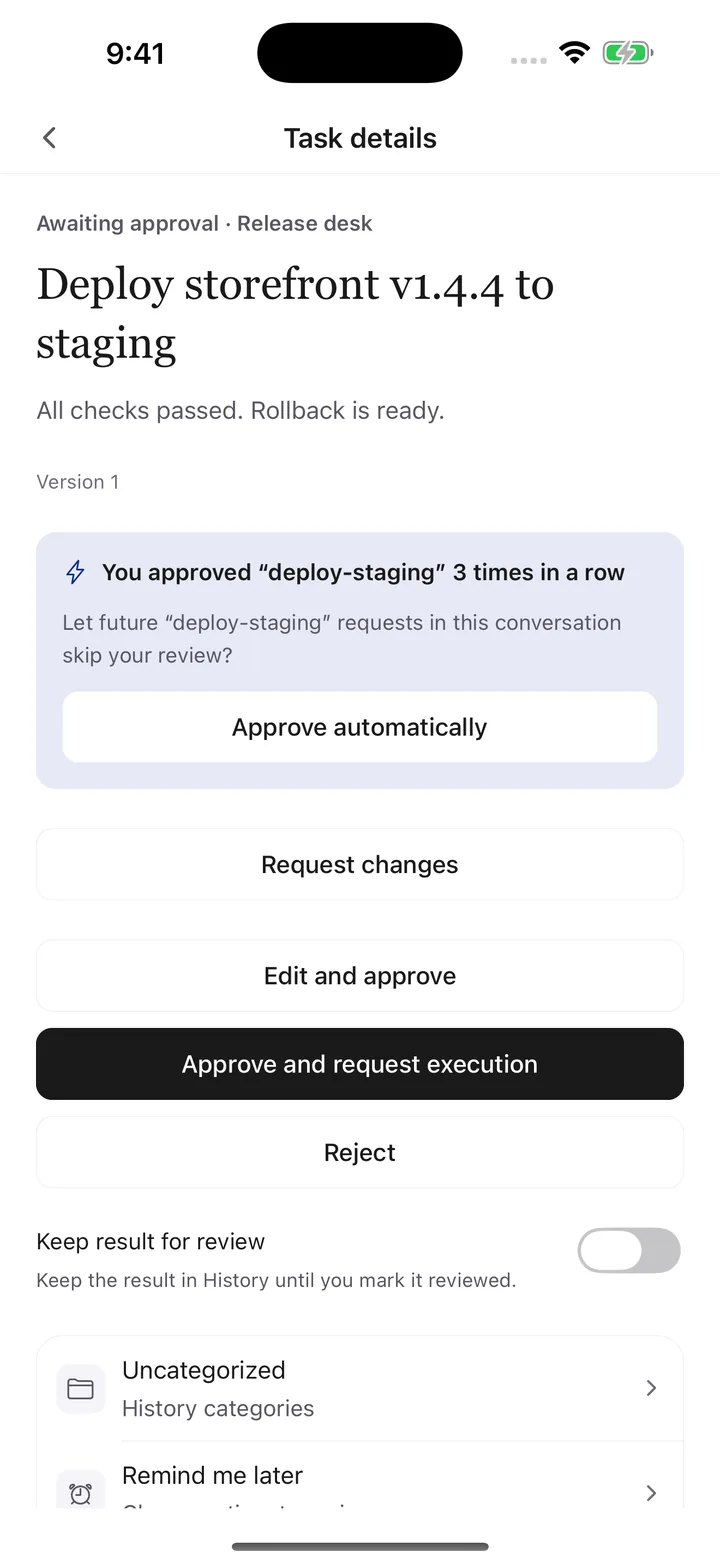
An offer to approve a repeated request kind automatically
Real app screen · example data

10 · Daily summaryiOS · Android · Web

One summary instead of FYI pings

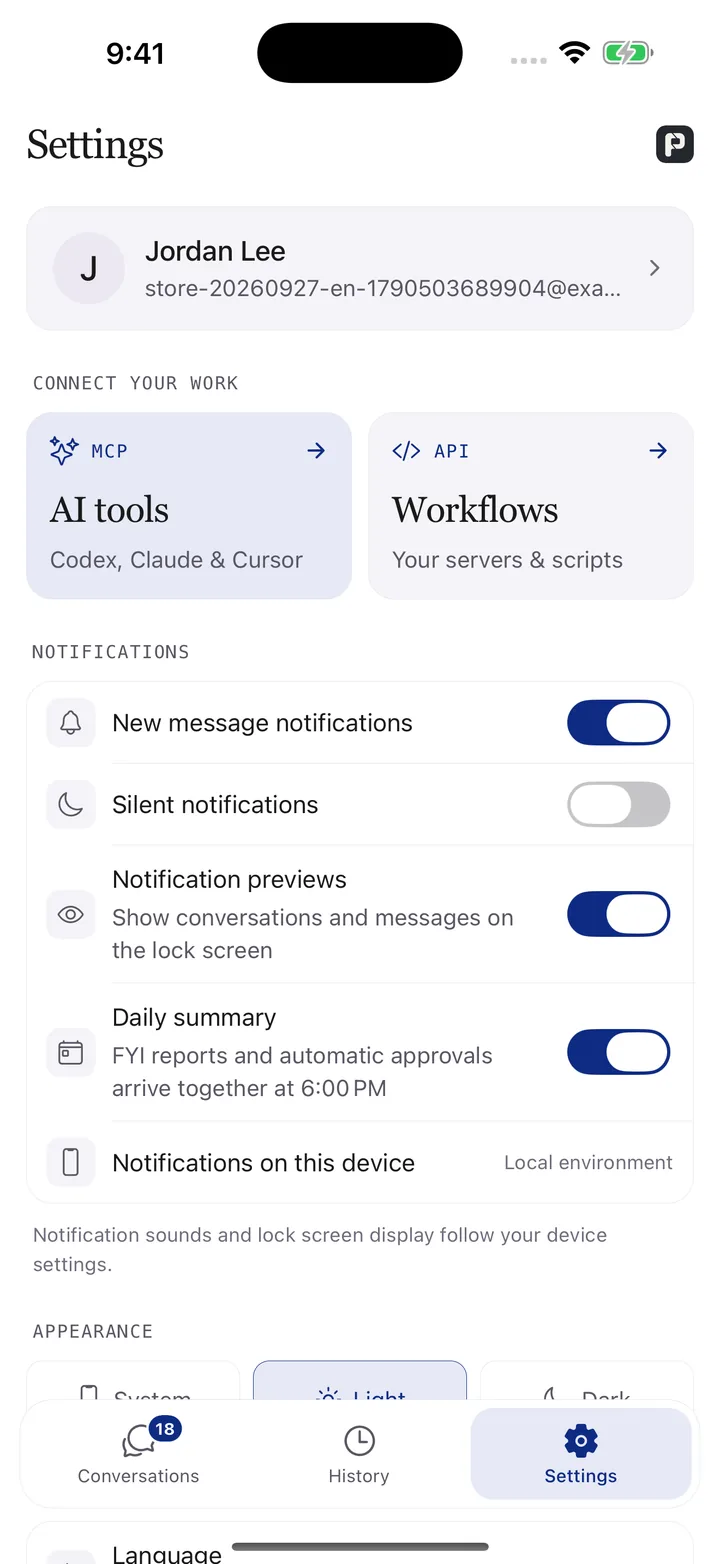
Low-priority reports and automatic approvals skip the immediate notification. Once a day, at the hour you pick in your own time zone, one notification tells you what arrived.

Included

  • Pick the hour, or turn the summary off
  • Quiet mode, notification previews and per-conversation mute stay separate
  • Questions and approval requests still notify immediately

Not included or limited

  • Only FYI updates and rule approvals wait for the summary

Available: iOS, Android and web

Notification settings with the daily summary
Real app screen · example data

When you need itControl, other screens and deeper records.

11 · Control and privacyiOS · Android · Web

Each program gets only what it needs

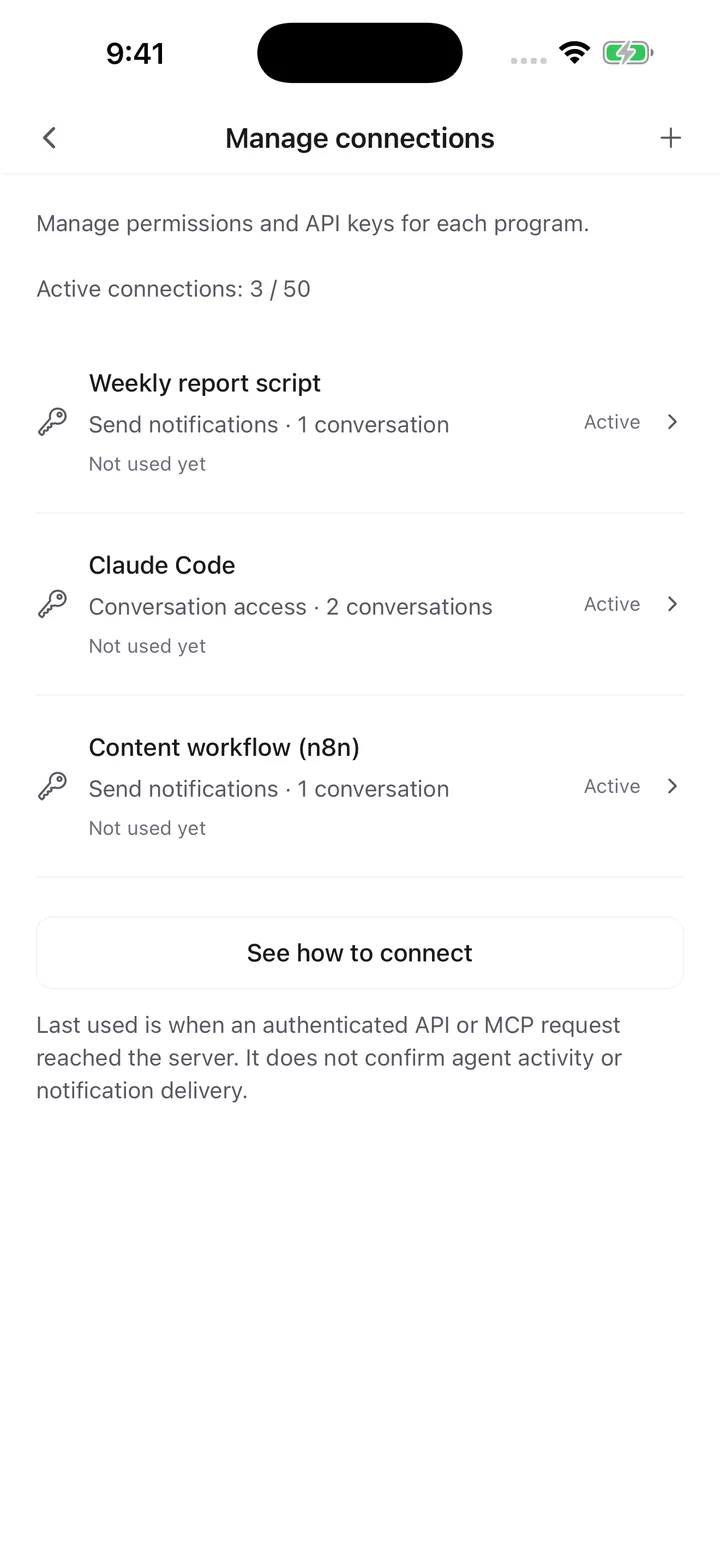
Give every program its own connection: which conversations it can reach, what it can do, and when its key expires. Revoke one without touching the others.

Included

  • Profiles for sending only, two-way work or reading; 1–20 conversations or all
  • Keys are shown once and stored only as hashes
  • HTML views run in an isolated sandbox without network access; lock screen previews are off by default

Not included or limited

  • Conversations are personal; shared team approvals are not available
  • A key is shown once; issue a new one if it is lost

Available: iOS, Android and web

Program connections with their scope
Real app screen · example data

12 · WebWeb

The same inbox on your computer

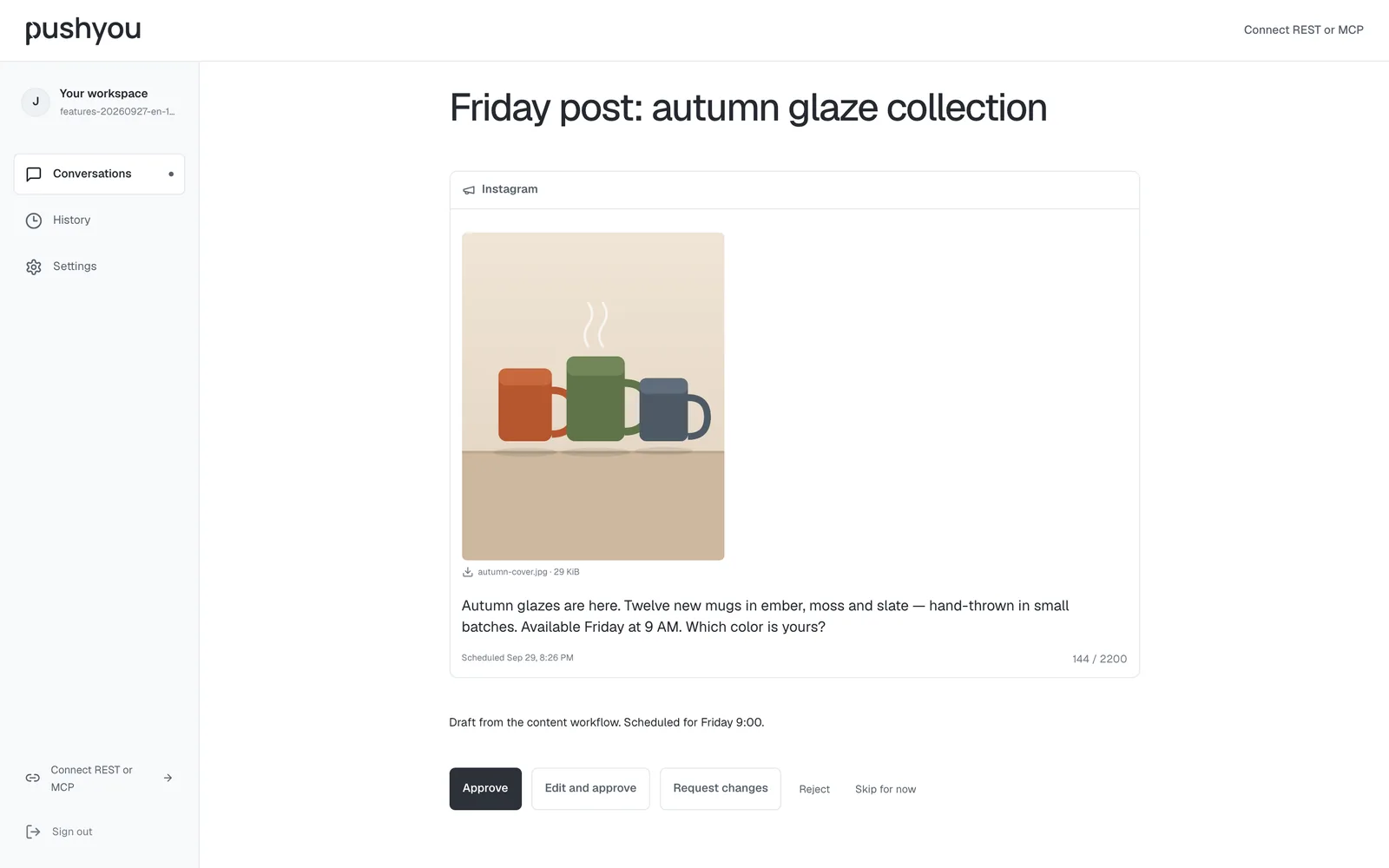
Scan a QR code with the app to sign in on the web. Read and answer conversations, work through the review queue, check insights and receive browser notifications.

Included

  • Each browser is approved from your phone and can be disconnected individually
  • Program keys and approval rules are turned on from the phone, never from a browser session alone
  • Browser notifications arrive once you allow them

Not included or limited

  • Issuing program keys and turning on rules need the phone app

Available: pushyou.app

The Pushyou web review queue with a content preview
Real app screen · example data

13 · HistoryiOS · Android · Web

Find any decision later

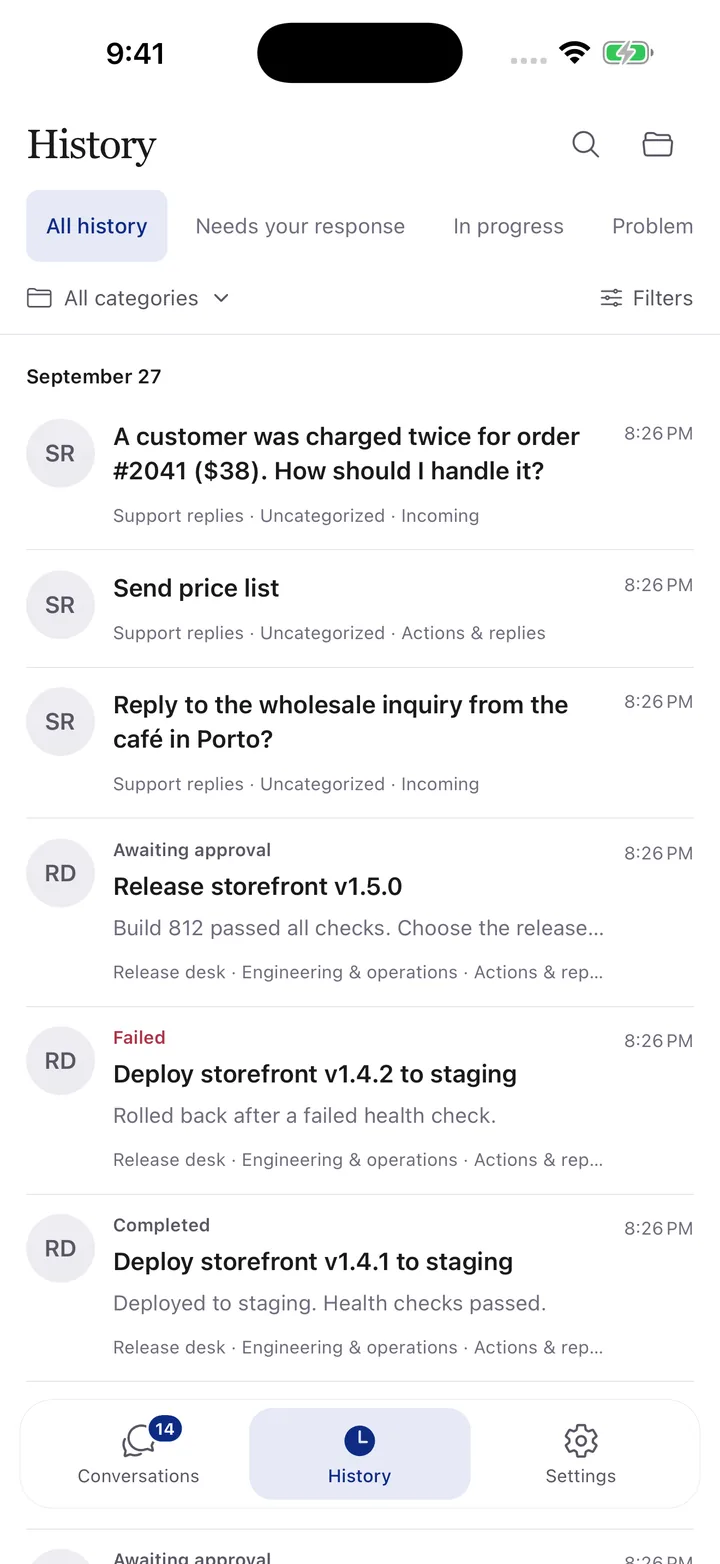
Every received update, action and saved message in one place, filterable by category, record type, request status and conversation, with older records loaded page by page.

Included

  • Five starter categories plus your own; archive what you no longer use
  • Status groups: needs response, in progress, problems and completed
  • Jump back to the original conversation

Not included or limited

  • Text search covers loaded records; filters cover all of history

Available: iOS, Android and web

History with category and status filters
Real app screen · example data

14 · Conversation formsiOS · Android · Web

Start work yourself

Programs publish reusable forms to a conversation, such as Request a report or Check an incident. You fill one in, and it goes straight to the program as approved work.

Included

  • Up to 30 forms per conversation, with the same field types as approvals
  • Submitted forms are tracked like any request until the result arrives
  • Publishing a form never runs anything by itself

Not included or limited

  • A form only starts work when a connected program handles it

Available: iOS, Android and web

A conversation form ready to submit
Real app screen · example data

15 · Decision insightsiOS · Android

See whether you are asked too often

Seven or thirty days of your decisions: how many, how fast, how often you approve, and how often approved work later failed. Suggestions point to rules worth creating and questions that wait too long.

Included

  • Approval rate, median response time and reversal rate
  • Questions answered, by button or by text
  • Per request kind, with a switch for its approval rule

Not included or limited

  • Read-only on the web; 7- or 30-day windows

Available: iOS and Android; read-only on the web
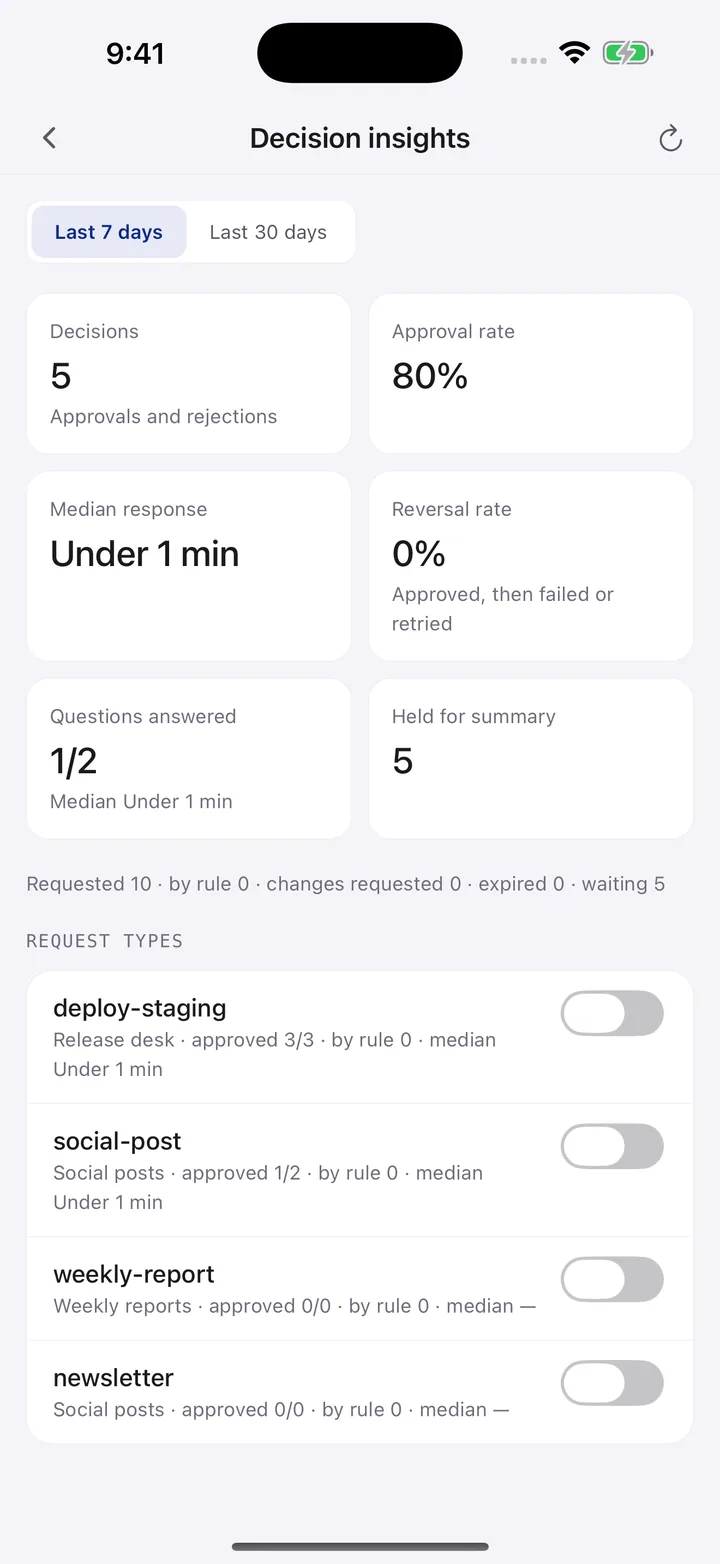
Decision insights with approval rate and response time
Real app screen · example data

What Pushyou does not do today

  • Running or hosting your agents and automations
  • Publishing to social networks or deploying for you
  • Shared team approvals and group conversations
  • Importing Telegram or Slack history
  • A paid plan: Pushyou is free today

Connect your first workflow.

MCP, REST, n8n and the receiver, with examples you can run.

Connection guide